How to Make an IRS Payment Online Fast
When you need to make an IRS payment online, speed comes down to two things: picking the right payment method for your situation and entering the exact tax details (form, type, period) the IRS uses to match your money to your account.
This guide walks you through the fastest online options, what information to gather first, and how to avoid the most common mistakes that cause delays.
Before you start: the 60-second checklist that prevents payment misapplies
Most “payment problems” are not bank issues, they are mismatched payment details. Take a minute to confirm what you are paying.
Have these items ready:
- Tax form (for example, Form 1040 for individuals, Form 720 for quarterly federal excise tax)
- Tax type (balance due, estimated tax, deposit, etc., based on the payment system you choose)
- Tax period (year or quarter, depending on the form)
- SSN/EIN (individual or business identifier)
- Bank account details (routing and account number) if paying from a bank account
If you are paying federal excise taxes, confirm whether you are making a quarterly payment with Form 720 or whether you are required to make semi-monthly deposits (many excise tax liabilities are deposited through EFTPS, and the deposit rules can differ from quarterly filing).
The fastest ways to pay the IRS online (choose based on your needs)
Different IRS online payment options are “fast” in different ways. Some are fastest to complete, some are fastest to post, and some are best when you need a clear audit trail for a business.
IRS Direct Pay (bank account)
IRS Direct Pay is one of the quickest ways to make an online payment from a checking or savings account because there are no third-party processor steps.
Use Direct Pay when:
- You want a no-fee bank transfer
- You want a confirmation number immediately
- You are making a one-time payment and do not need EFTPS features
Direct Pay generally lets you schedule payments in advance, which can help if you are paying close to a deadline.
IRS Online Account (pay from your account)
If you already use the IRS’s online services, you can pay through your IRS Online Account (for eligible tax types). This can be fast because your identity is already verified and you can view balance information.
Use this when:
- You want to see what the IRS shows as due
- You want a central place to view payments and notices
EFTPS (best for businesses and repeat excise tax payers)
The Electronic Federal Tax Payment System (EFTPS) is a standard IRS payment channel for many business payments, including excise tax deposits.
Use EFTPS when:
- You are a business paying with an EIN
- You need a consistent process for recurring payments
- You may need to make excise tax deposits (not just quarterly payments)
Important: EFTPS enrollment can take time because it involves mailed PIN verification. If you are new to EFTPS and you have an urgent deadline, you may need an alternative method while you complete enrollment.
Debit card or credit card (fastest checkout, but fees apply)
Paying by card can be the fastest “checkout-style” experience, especially if you do not want to enter bank routing/account numbers. The IRS uses approved payment processors for card transactions.
Start at the IRS page for paying by debit or credit card.
Use card payments when:
- You need to complete the payment quickly and do not want bank transfer steps
- You accept the processing fee charged by the payment processor
Same-day wire (fast when you missed the window)
If you are up against a cutoff or you need same-day settlement for certain business payments, a same-day wire can be an option. It is not always the simplest route, but it can be the fastest in late situations.
The IRS covers requirements on its payments page under same-day wire information: IRS payments options.
Quick comparison: which online IRS payment method is fastest for you?
| Payment method | Typical fees | Best for | Key limitation to know |
|---|---|---|---|
| IRS Direct Pay | $0 | Fast bank payments with immediate confirmation | Not designed for deposit-style workflows like EFTPS |
| IRS Online Account | $0 (bank payment options) | Paying while viewing IRS balance info | Eligibility and access depend on account setup |
| EFTPS | $0 | Businesses and recurring payments, excise tax deposit workflows | Enrollment can take time due to mailed PIN |
| Debit/Credit card | Processor fee | Fastest “checkout” experience | Fees apply, and limits can vary by processor |
| Same-day wire | Bank fees likely | Last-minute, time-sensitive cases | Requires careful instructions and bank coordination |
How to make an IRS payment online fast (without step-by-step confusion)
Below is a simple flow that works for most taxpayers and businesses.
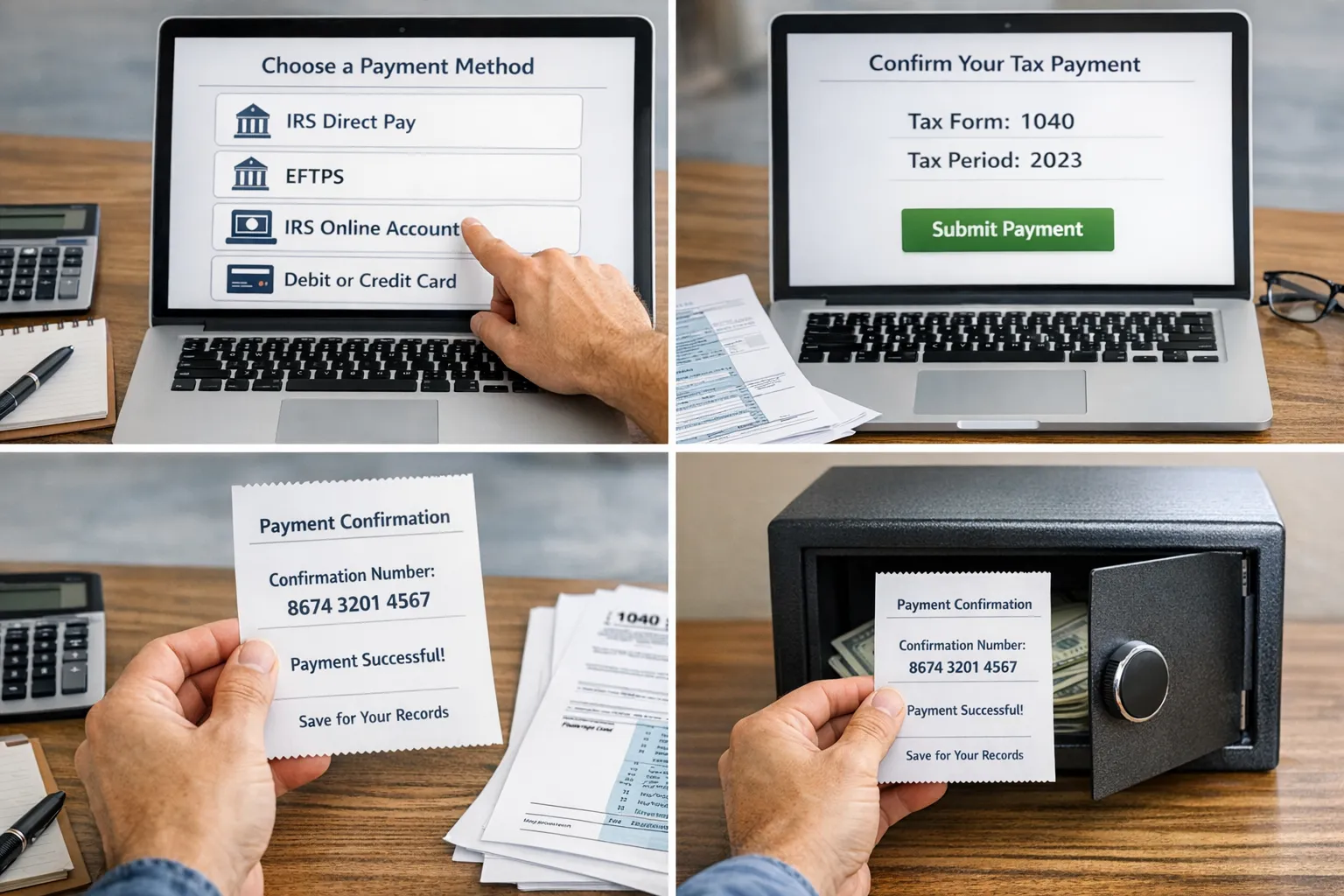
Step 1: Match the payment channel to your situation
- Paying from a bank account today with no fees: choose IRS Direct Pay.
- Paying repeatedly (especially as a business): choose EFTPS.
- Paying quickly with a card and you accept the fee: choose the IRS-approved card processor route.
- Unsure what the IRS thinks you owe: use IRS Online Account to confirm balances.
Step 2: Select the correct tax form and period
This is the most important accuracy step. The IRS uses the “form” and “period” to apply your money properly.
Examples:
- Individuals commonly pay under Form 1040-related tax types.
- Excise tax filers often need payments tied to Form 720 quarters.
If you are paying an excise tax that requires deposits, your payment selection inside EFTPS may need to reflect a deposit schedule rather than a quarterly “balance due.” When in doubt, confirm the payment type in the official IRS instructions for your tax.
Step 3: Save proof immediately
Regardless of method, save your proof while you have it:
- Confirmation number
- Payment date and amount
- Screenshot or PDF of the confirmation page
This is especially important for business compliance and for any payment tied to a filing deadline.
Common mistakes that slow down online IRS payments
Choosing the wrong tax period
A payment can “go through” but land in the wrong period, which can still trigger notices. For quarterly filers like Form 720 taxpayers, selecting the correct quarter matters.
Using the wrong tax type
For some taxes, the IRS distinguishes between payments like “return,” “estimated,” and “deposit.” If you select the wrong type, your payment may not satisfy the requirement you intended.
Waiting until the last day to set up EFTPS
EFTPS is excellent for ongoing business payments, but it is not the best choice if you are trying to pay today and you are not enrolled.
Paying on an unofficial site
Always start from an IRS page such as IRS payments. Avoid ads or lookalike domains that mimic IRS branding.
What if you can’t pay in full today?
If you can file on time but cannot pay the full amount immediately, it is usually better to still pay something and then resolve the rest through an IRS plan.
Two common options:
- Short-term payment plan (time to pay without a long application process in many cases)
- Installment agreement for longer-term repayment
Start with the IRS page on payment plans and installment agreements.
Special notes for Form 720 (Quarterly Federal Excise Tax) payers
If your IRS payment online relates to Form 720, keep these points in mind:
Your “payment” might be a deposit requirement
Many federal excise taxes follow deposit rules, and the IRS commonly expects those deposits through EFTPS. Your quarterly Form 720 filing and your deposit activity should align.
If you are unsure whether you owe deposits or only a quarterly balance, review the Form 720 instructions on the IRS site: About Form 720.
File first (or file on time), then pay using the correct channel
For many businesses, the fastest compliance path is:
- Prepare and e-file the return accurately
- Make the payment online using the method that matches your filing and deposit requirements
- Save both the filing acknowledgment and the payment confirmation
If you need to e-file Form 720 (including categories across the form, amendments on 720-X, or claims using Form 8849), you can do that through an IRS-authorized e-file provider.
eFileExcise720 is an IRS-authorized platform designed specifically to help taxpayers prepare and e-file Form 720 online with secure handling and dedicated customer support.
If you want a deadline refresher for quarterly filing, see the site’s guide to Form 720 due dates.
The fastest “safe” approach in one sentence
Choose IRS Direct Pay for a quick no-fee bank payment, choose EFTPS for ongoing business and excise tax workflows, and always double-check the form and tax period before you click submit.
When you are ready to file your Form 720 electronically and keep your compliance records clean, you can start here: eFile your Form 720 online with eFileExcise720.