Federal Form 720 Due Dates and Filing Steps
If your business reports federal excise taxes, the federal Form 720 deadline is not something to treat like a once-a-year tax task. Form 720, officially the Quarterly Federal Excise Tax Return, is generally filed four times per year, and certain excise taxes may also require deposits before the quarterly return is due.
That is where many filing mistakes begin. A business may know it has an excise tax obligation, but still miss a deposit date, use the wrong quarter, forget a required schedule, or assume the payment deadline is the same for every tax category.
This guide gives you a practical filing calendar and a clear step-by-step process for preparing and submitting federal Form 720 in 2026.
Federal Form 720 due dates for 2026
Federal Form 720 is generally due by the last day of the month following the end of each calendar quarter. If the due date falls on a Saturday, Sunday, or legal holiday, the deadline moves to the next business day.
| Quarter | Reporting period | Standard due date | 2026 filing deadline |
|---|---|---|---|
| 1st quarter | January 1 to March 31 | April 30 | April 30, 2026 |
| 2nd quarter | April 1 to June 30 | July 31 | July 31, 2026 |
| 3rd quarter | July 1 to September 30 | October 31 | November 2, 2026 |
| 4th quarter | October 1 to December 31 | January 31 of the following year | February 1, 2027 |
The third and fourth quarter deadlines shift because October 31, 2026 falls on a Saturday and January 31, 2027 falls on a Sunday.
You can verify current filing rules directly through the IRS Form 720 page and the IRS Instructions for Form 720. These IRS resources are especially important if your business has special tax categories, credits, deposits, or attachments.
Filing deadline vs. deposit deadline: know the difference
The quarterly Form 720 due date tells you when the return is due. It does not always mean you can wait until that date to pay every excise tax liability.
Many excise taxes reported on Form 720 require semi-monthly deposits, typically through the Electronic Federal Tax Payment System. A semi-monthly period usually means the 1st through the 15th of the month and the 16th through the last day of the month. Deposits are generally due by the 14th day after the close of the semi-monthly period, subject to weekend and holiday adjustments.
| Compliance item | What it means | Practical filing note |
|---|---|---|
| Quarterly return | The Form 720 return for the quarter | Due April 30, July 31, October 31, and January 31, adjusted for weekends and holidays |
| Semi-monthly deposits | Prepayments for certain excise tax liabilities | May be required before the quarterly return is filed |
| Balance due | Any remaining tax due with the return | Should be paid by the Form 720 deadline to reduce penalty and interest risk |
| EFTPS payment timing | Electronic payment scheduling | EFTPS payments generally must be scheduled in advance, so do not wait until the last minute |
If your business uses EFTPS for federal tax payments, enroll early and schedule payments before the deadline. EFTPS enrollment can take time, and late payment scheduling can create avoidable compliance issues.
Who may need to file federal Form 720?
Federal Form 720 is activity-based. Your entity type does not decide whether you file. Your taxable activities do.
A business may need to file Form 720 if it manufactures, sells, collects, imports, provides, or sponsors items or services subject to federal excise tax. Common examples include fuel-related activities, environmental taxes, communications services, air transportation, indoor tanning services, foreign insurance, certain manufacturer taxes, and PCORI fees for applicable health plans.
For a broader explanation of the form and how it works, see our guide on what Form 720 is and how to file it.
Here are common filing triggers to review before each quarter:
- You collected or owe communications or air transportation excise taxes.
- You sold, used, imported, or removed taxable fuel or petroleum products.
- You are responsible for environmental excise taxes, including certain chemical or oil-related taxes.
- You provide indoor tanning services subject to federal excise tax.
- You paid premiums to a foreign insurer for taxable insurance coverage.
- You are an insurer or plan sponsor responsible for reporting PCORI fees.
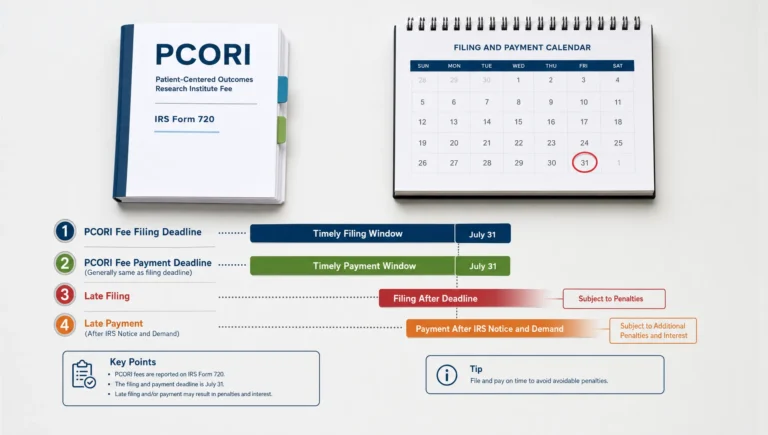
PCORI fees are a special case because they are generally reported annually on the second quarter Form 720, due July 31. For 2026, many PCORI filers will use the July 31, 2026 deadline for applicable plan or policy years ending in 2025. Always confirm the correct fee year and counting method before filing.
What information should you gather before filing?
Good Form 720 filing starts before you open the return. The most common errors come from weak source data, not from the final submission step.
At minimum, gather your legal business name, EIN, address, quarter, responsible contact information, tax category details, and payment records. Then collect the operational records that support each tax line, such as gallons, barrels, premiums, gross receipts, passenger charges, covered lives, or taxable service charges.
| Filing area | Records to gather | Why it matters |
|---|---|---|
| Business profile | EIN, legal name, address, contact details | Prevents IRS matching and identity errors |
| Tax category | Form 720 line item, IRS number, taxable activity | Helps report the tax on the correct line |
| Computation data | Units, rates, receipts, premiums, covered lives, or gallons | Supports accurate tax calculation |
| Deposits and payments | EFTPS confirmations, payment dates, amounts | Prevents duplicate payments or underpayment issues |
| Credits or claims | Supporting invoices, exempt-use records, prior overpayments | Helps determine whether Schedule C, Form 8849, or another process applies |
| Attachments | Form 6627, Schedule T, Schedule C, or other required schedules | Reduces rejection and notice risk |
Keep documentation long enough to support your filed returns, payments, claims, and adjustments. The IRS instructions generally require excise tax records to be retained for years after the return or payment date, so businesses should maintain a consistent recordkeeping system.
Federal Form 720 filing steps
The best way to stay compliant is to use the same workflow every quarter. Even if your liability changes, the process should stay consistent.
Step 1: Confirm the quarter you are filing
Start by matching the taxable activity to the correct calendar quarter. Do not use the invoice date automatically unless that is the correct tax trigger for your category. Depending on the excise tax, the taxable event may be a sale, use, removal, importation, collection, premium payment, or plan-year reporting obligation.
A common mistake is filing a transaction in the quarter when the accounting team found it, instead of the quarter when the excise tax liability actually arose. This can create amended returns, penalties, or payment mismatches.
Step 2: Identify the correct Form 720 category and line
Form 720 covers many different federal excise taxes. Each category has its own rules, rates, definitions, and sometimes schedules.
For example, a business reporting fuel activity may need different documentation than a plan sponsor reporting PCORI fees. A company reporting environmental tax may also need Form 6627. A business claiming an allowable adjustment may need Schedule C or a separate refund process.
Do not assume that similar products or services use the same line. Review the IRS instructions and confirm the exact Form 720 category before calculating the tax.
Step 3: Calculate the liability using the correct rate and tax base
Once you identify the category, calculate the excise tax using the correct tax base. Some taxes are based on units, such as gallons or barrels. Others may be based on percentages, premiums, service charges, or covered lives.
This is where documentation matters. If your source reports use different units than the Form 720 line requires, convert them carefully and keep a copy of the calculation. Unit conversion errors are especially common in fuel, petroleum, chemical, and import-related filings.
Step 4: Reconcile deposits and payments
Before filing, compare calculated liability with deposits already made for the quarter. Confirm payment dates, EFTPS confirmation numbers, amounts, and the tax period selected when the payment was scheduled.
If your business made deposits under the wrong period or tax type, you may need to resolve the mismatch before or after filing. Keeping a deposit log for each quarter can make this step much easier.
Step 5: Prepare required schedules and attachments
Some Form 720 filings are simple. Others require additional schedules or supporting forms.
Common examples include Form 6627 for certain environmental taxes, Schedule T for specific two-party exchange reporting, and Schedule C for certain claims reported with Form 720. If your business is seeking a refund rather than reporting current-quarter liability, you may need Form 8849 instead. If you are correcting a previously filed Form 720, you may need Form 720-X.
If you are unsure whether you need Form 720, Form 720-X, or Form 8849, review our comparison of Form 720 vs. Form 8849.
Step 6: Review the return before submission
Before submitting, review the return the way the IRS systems may review it. Check the EIN, tax period, tax category, line amounts, schedules, signature details, and payment information.
Pay special attention to zeroes, decimals, and unit quantities. A misplaced decimal in an excise tax return can create a large overstatement or understatement. Also confirm that the return is being submitted for the correct quarter, not simply the current calendar quarter.
Step 7: File and save proof of submission
After filing, save your confirmation, IRS acknowledgment, payment confirmations, and a copy of the final return. If you e-file, keep the electronic acknowledgment with your tax records. If the IRS rejects the submission, correct the issue promptly and resubmit as soon as possible.
Businesses that mail paper returns should allow extra time for delivery and processing. E-filing is usually faster and provides confirmation that is easier to store and retrieve later.
Common mistakes that lead to late or incorrect Form 720 filings
Most Form 720 problems are preventable. They usually happen because the excise tax process is handled manually, left until the deadline, or managed separately from accounting and operations.
| Mistake | Why it creates risk | How to prevent it |
|---|---|---|
| Using the wrong quarter | The IRS may not match the return and payment correctly | Build a quarterly close calendar for excise taxes |
| Missing deposit requirements | Penalties can apply even if the quarterly return is filed | Track semi-monthly liabilities throughout the quarter |
| Choosing the wrong tax category | The liability may be reported on the wrong line | Review the IRS number and Form 720 instructions |
| Forgetting attachments | Missing forms can delay or complicate processing | Use a pre-filing checklist for each category |
| Waiting until the due date | Payment scheduling, review, or rejection issues may cause lateness | Prepare the return several days before the deadline |
| Treating refunds as reductions without support | Unsupported claims can trigger notices or delays | Keep invoices, exemption certificates, and usage records |
For a more detailed quarterly preparation workflow, use our Form 720 e-filing checklist for 2026.
What if you miss a Form 720 due date?
If you miss a deadline, the best first step is usually to file as soon as possible and pay any tax due. Waiting can increase penalties and interest.
Late Form 720 filings can involve failure-to-file penalties, failure-to-pay penalties, interest, and deposit penalties when required deposits were missed. The exact outcome depends on the facts, including how late the return or payment is, the amount due, deposit history, and whether the business has reasonable cause.
If the return you filed was incorrect, you may need to amend using Form 720-X. If you overpaid or qualify for a refund of certain excise taxes, Form 8849 may be the better path. Do not file a new original Form 720 for a quarter that was already filed unless the IRS specifically instructs you to do so.
You can learn more in our guide to Form 720 penalties and interest.
Why many businesses e-file federal Form 720
Paper filing can work, but it adds time and uncertainty. Businesses often choose e-filing because they want faster submission, cleaner records, and confirmation that the return was transmitted.
eFileExcise720 is an IRS-authorized online platform built for Form 720 excise tax filing. You can create an account for free, file without downloading software, use a simple dashboard, and get personalized customer support when you need help navigating the filing process.
The platform supports all Form 720 categories and also provides support for Form 720 amendments and Form 8849 claims. It is designed to help businesses file securely, reduce manual steps, and manage excise tax compliance with less stress.
Frequently Asked Questions
When is federal Form 720 due? Federal Form 720 is generally due by the last day of the month after each quarter ends: April 30, July 31, October 31, and January 31. If the date falls on a weekend or legal holiday, the deadline moves to the next business day.
What are the 2026 Form 720 due dates? The 2026 deadlines are April 30, 2026 for Q1, July 31, 2026 for Q2, November 2, 2026 for Q3, and February 1, 2027 for Q4.
Do I have to pay excise tax before filing Form 720? Possibly. Certain excise taxes require semi-monthly deposits before the quarterly Form 720 is due. Check the IRS instructions for your specific tax category and use EFTPS when required.
Can I file Form 720 online? Yes. Businesses can e-file Form 720 through an IRS-authorized provider such as eFileExcise720. E-filing can help reduce mailing delays and provides electronic submission confirmation.
What if I had no Form 720 tax liability this quarter? If you are already expected to file or need to report zero liability for a quarter, a zero liability return may help keep your records consistent and reduce IRS notice risk. Review your filing history and obligations before skipping a quarter.
Do PCORI fees use the same Form 720 due dates? PCORI fees are reported on Form 720, but they are generally filed annually on the second quarter return due July 31. For 2026, many filers report applicable plan or policy years ending in 2025 by July 31, 2026.
Ready to file Form 720 online?
If your federal Form 720 deadline is approaching, do not wait until the final day to gather records, calculate deposits, and prepare schedules.
With eFileExcise720, you can file through an IRS-authorized e-filing portal, create an account for free, use secure online filing, and get customer support for Form 720, Form 720-X amendments, and Form 8849 claims. Start your filing process today and keep your quarterly excise tax compliance on track.